Marketing automation is software that runs repeatable marketing workflows based on customer data, rules and events, then measures the results. The University of Hamburg's 2022 study of companies in Germany reported strategic adoption by 44% and identified 9,932 solutions in the global market.
A website form, customer database, email campaigns and advertising budget may already be in place. Yet if a lead arrives after hours without follow-up, or campaign activity cannot be tied to revenue, those tools are not operating as a system. Automation can connect them, but it earns its place only when data is clean, rules have clear owners and results are reviewed. Otherwise, it can repeat bad records and weak decisions faster.
What Marketing Automation Does
An HVAC company receives a call late on Friday. No one answers, and the caller books with a competitor before Monday. A connected workflow can respond promptly, offer an available appointment, and follow up if the person does not reply. The business can then track whether the follow-up led to a booking. Its value comes from connecting a customer action to a measurable outcome, not just sending a message.
Marketing automation uses software and web-based services to manage, measure and improve recurring marketing tasks across channels. It links customer data with segments, rules, triggers, lead management and personalized communication. A historical overview of marketing automation traces the field's development from customer relationship management systems in the 1990s, including early commercial products. The category now covers more than email, coordinating actions across customer journeys.
The distinction is like the one between a timer and a thermostat. A timer turns the heating on at a set time, whether or not the room is cold. A thermostat responds to the room's temperature. Scheduled email is the timer. Marketing automation is the thermostat.
A 2022 University of Hamburg study of companies in Germany reported strategic adoption of marketing automation by 44% of respondents. The same study found that the market had grown by 24% since 2020, reaching 9,932 identified solutions worldwide, according to the historical overview of marketing automation. A large market does not guarantee that a business's data or follow-up process is ready. If records are incomplete or no one owns the rules, automation can repeat errors at scale.
| Tool | What It Does | What It Cannot Do Alone |
|---|---|---|
| Email scheduler | Sends one message at a set time | Does not respond to customer actions or branch based on behavior |
| CRM | Stores contacts, deals and interaction history | Does not run multi-channel campaigns on its own |
| Marketing automation platform | Runs triggered, multi-channel workflows based on behavior data | Needs clean data, consent records and agreed rules |
| Ad-platform bid automation | Adjusts bids and budgets inside one ad network | Sees only that platform's data |
The practical test is straightforward: if an action depends on what a person did, it's automation; if it fires only on a calendar, it's scheduling. Automation still needs clear ownership and human review. Without them, a workflow may send the wrong follow-up or keep acting after the business should have stepped in.
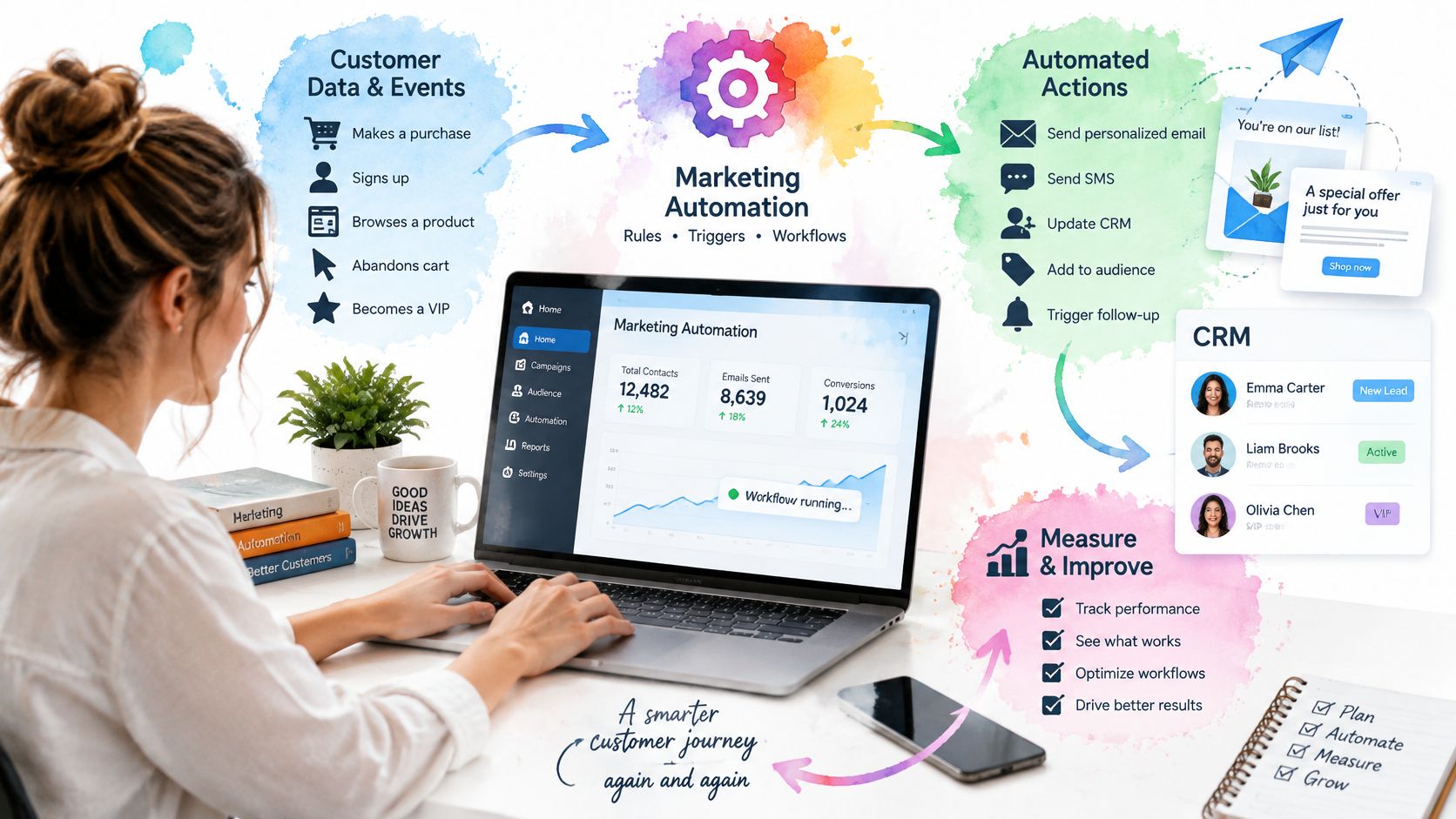
The Components and Data Flow Behind Every Workflow
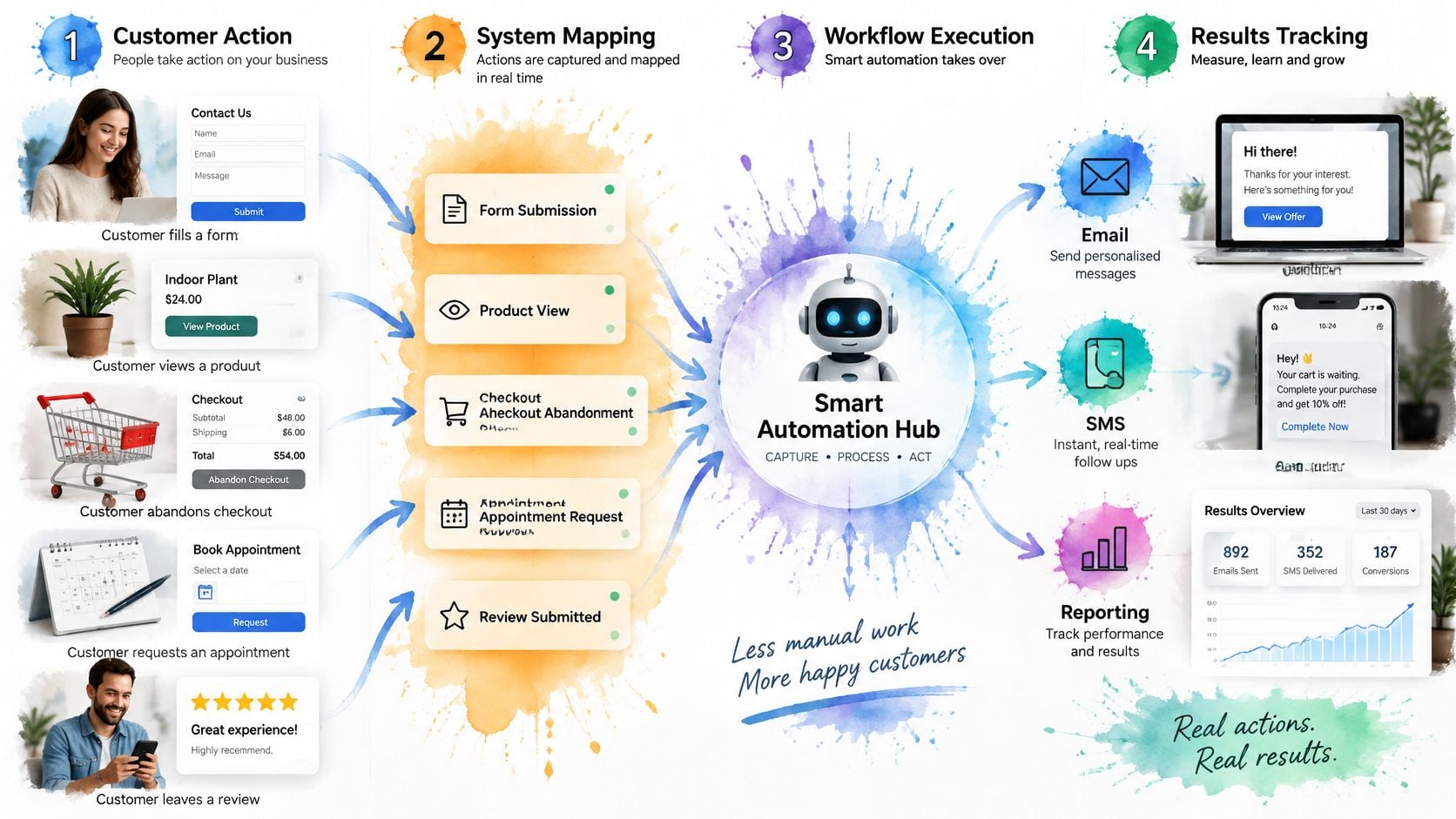
A reliable workflow follows a closed loop. It doesn't stop once a message goes out. The customer's response needs to return to the record, so the next action reflects what happened.
- A customer action occurs. Someone fills out a form, views a product, abandons checkout, requests an appointment or responds to a review request.
- The system identifies the person and their place in the journey. It connects the event to a customer profile, segment and lifecycle stage.
- The system checks eligibility. Consent, channel preferences and suppression rules determine whether a message can be sent.
- The workflow takes an action. It might send an email, SMS or web message, or update an advertising audience.
- The response is written back. A click, booking, purchase, opt-out or lack of response updates the customer record and informs the next decision.
The fifth step is the one many setups skip. Without it, a workflow can repeat messages the customer has already acted on, while marketing and sales end up with different versions of what happened. The system may still send communications, but it can't reliably connect them to outcomes.
The closed-loop approach to marketing automation depends on recording events, applying eligibility and consent rules, executing channel actions and writing responses back to customer records. It also requires process design and coordination between marketing and sales, not just software setup. Before building complex workflows, define what counts as an event, how people are identified, what each lifecycle stage means and how conversions are recorded. For help thinking through connected records and systems, see our guide to marketing data integration.
Seven components the workflow relies on
- Contact and CRM record: Keep one useful profile per person, including details such as last purchase or last service date.
- Consent and suppression layer: Record unsubscribes, SMS opt-ins and do-not-contact flags so the workflow knows who it can contact.
- Segmentation: Group people by relevant behavior or status, such as customers with no visit in a defined period.
- Trigger and workflow engine: Start the right sequence when an event occurs, such as an abandoned quote beginning a follow-up sequence.
- Channel execution: Coordinate the chosen actions. For example, a workflow might send an email and update a retargeting audience for the same segment.
- Lead scoring and routing: Apply agreed criteria, then notify the right sales owner when a lead meets the threshold.
- Measurement and attribution: Track outcomes that matter to the business, such as booked jobs and revenue by campaign.
The shared customer record is the dependency underneath all seven. Separate copies in an email system and an advertising system can lead to duplicate messages and missing context. Think of the rules as recipes, the data as the pantry and the workflow engine as the cook. If the pantry is mislabeled, a perfectly reliable cook can still serve the wrong dish.
Business Gains and the KPIs That Prove Them
Automation earns its place through speed, consistency and measurable revenue. A timely response can reach a prospect while their need is active. Consistent follow-up means each eligible lead receives the agreed messages, even when staff are busy. Revenue measurement connects the workflow to buyers, bookings or repeat business, rather than treating message activity as the result.
Choose KPIs based on the workflow's job. An email open rate can help diagnose delivery or subject-line performance, but it does not show whether a lead booked or a customer returned.
| KPI | What It Tells You | Where to Read It |
|---|---|---|
| Speed to first response | Whether leads are contacted while intent is high | CRM timestamps |
| Lead-to-customer conversion rate | Whether nurture sequences produce buyers | CRM pipeline stages |
| Cost per acquired customer | Whether ad spend turns into paying customers | Ad platform plus CRM revenue |
| Revenue per contact | The value of each person a workflow touches | CRM revenue report |
| Repeat or rebooking rate | Whether lifecycle messages keep customers | CRM cohort view |
| Review volume and rating | Whether review requests turn into public reputation | Review management dashboard |
| Unsubscribe and complaint rate | Whether messages are wearing people out | Email platform reports |
Read results in sequence. First check response speed and delivery. Then assess conversion, and allow the full sales cycle to play out before judging revenue. Google's Enhanced Conversions guidance says hashed first-party data can be sent through the Google Ads API for up to 24 hours after a conversion. The guidance also says the feature needs up to 30 days of training before its impact appears in reporting. Late conversion data or an early verdict can distort the result, making a useful workflow look ineffective or a weak one look promising.
Use a similar holdout group that does not receive the workflow to judge whether it contributes to the outcome. If a KPI moves the wrong way, check data quality and measurement timing before changing the message or offer. The Advertising Suite tests, measures and optimizes campaigns rather than guessing. Its approach to data-driven marketing focuses on business outcomes, not dashboard activity alone. A workflow is an operating system for the funnel only when its data is reliable, someone owns the result, and a person reviews what the numbers mean.
Industry Use Cases for Local, E-commerce and Franchises
A single automation system can serve different businesses, but the trigger, action and metric need to fit the customer journey. A review request after a home repair is not the same workflow as a reminder to finish an online purchase. Use the event that matters to the customer and the business, then measure the outcome that follows.
There's a gap between willingness and action in reviews. BrightLocal's 2025 Local Consumer Review Survey found that 96% of consumers are open to writing a review for a business, while 29% had written a business review in the previous year. A timely request can prompt action, but only if it reaches the right customer and the business stops following up once the person has responded.
| Industry | Trigger | Automated Action | Metric to Watch |
|---|---|---|---|
| Home services, such as HVAC or plumbing | Job marked complete in field software | Send a review request by text, then a seasonal maintenance reminder | Review volume and repeat service bookings |
| Legal intake | Web form or call captures a matter type | Send an instant reply, ask qualifying questions and offer consultation booking | Consultation show rate and cost per signed matter |
| Medical and dental clinics | Appointment completed | Send a post-visit survey and a recall reminder at the appropriate interval | Recall rebooking rate and no-show rate |
| E-commerce | Abandoned cart or a post-purchase interval | Start a recovery sequence or replenishment reminder | Recovery rate and repeat purchase rate |
| Multi-location franchise | Review received for a specific location | Route the reply to that location's manager and report by site | Response time and rating per location |
Say an HVAC job is marked complete in the field system. That event can trigger a review request by text the same day, with the customer suppressed if they've already reviewed. Later, the business can send a maintenance reminder timed to that customer's service history. The workflow is only useful if the job status, customer record and review response are connected.
For franchises, route each review to the manager responsible for that site. Location-level response time and ratings show where support is needed, while a blended company average can hide a weak branch behind stronger locations. For practical help attracting local prospects, explore lead generation for local businesses.
Automation should also know when to pause. Medical and legal messages can affect sensitive decisions, so have a person check the tone and content before those communications go out.
How to Build Your Automation Roadmap in Five Phases
Start with one workflow, not a shopping list of automations. The sequence below gives each phase a clear gate, so the team can catch weak data or unclear ownership before either gets embedded in a live campaign.
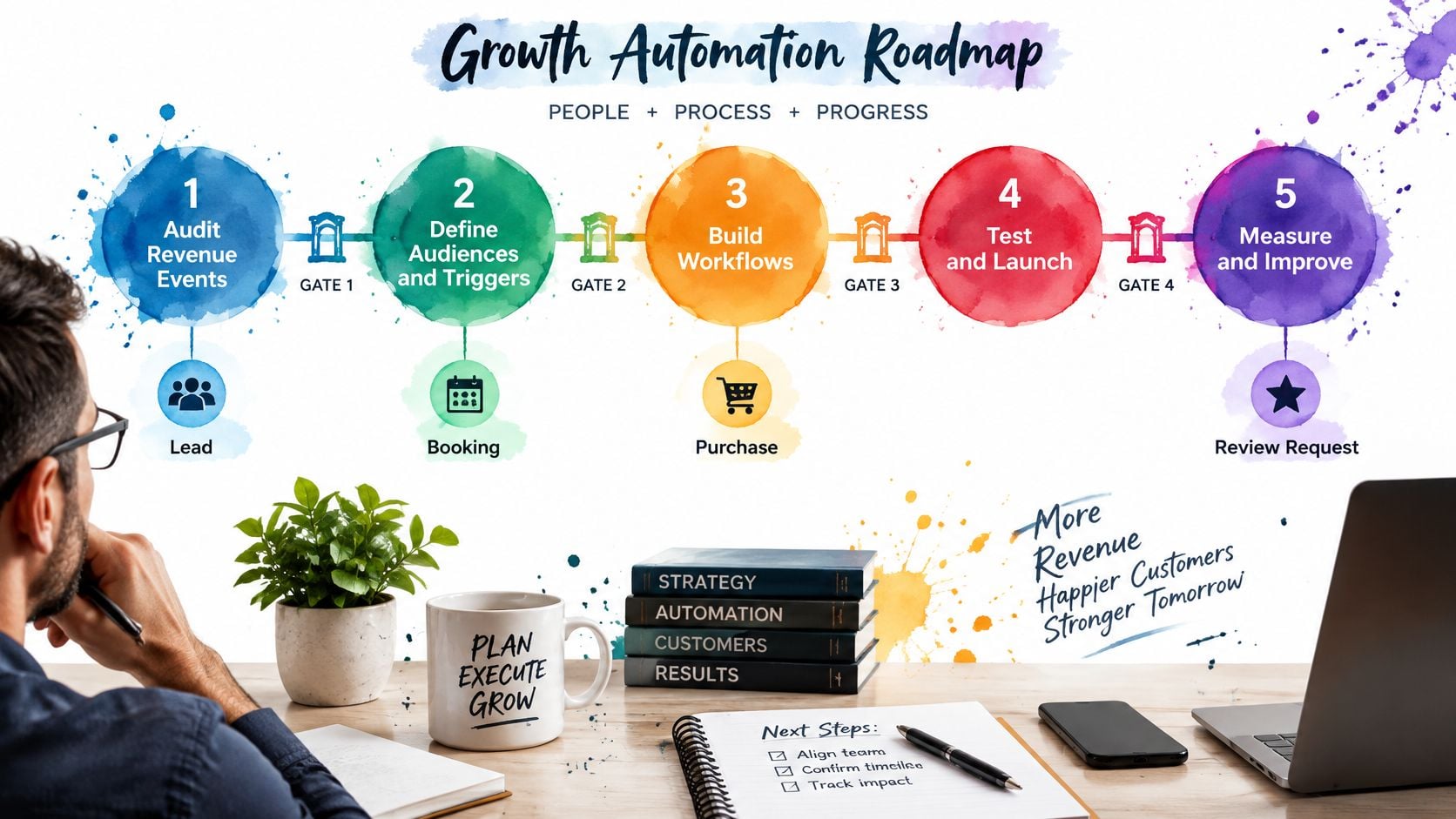
Audit the revenue events. List the few customer actions most closely tied to revenue, such as a new lead, a booking, a purchase or a review request. Record how the business handles each one now, including the response time and where the outcome is stored. This shows where a delay or missed handoff is costing an opportunity.
Fix the data foundation. Agree on lifecycle stages, required CRM fields, lead-source tracking, consent records, duplicate handling, routing rules and offline conversion capture. Check a sample of 50 records. This gate passes when the required fields are filled in and no duplicate records remain in the sample.
Build one workflow for one goal. Choose a clear outcome, such as responding to new leads faster or recovering abandoned bookings. Keep the success metric specific. A workflow that tries to improve every stage of the funnel at once is hard to diagnose when results disappoint.
Instrument and test. Track the customer event through to the outcome, then compare the workflow with a holdout group that doesn't receive it. Run the test for a full cycle. This gate passes when the team can explain the difference between the groups using the records and the agreed metric, rather than a handful of favorable anecdotes.
Expand one workflow at a time. Add another workflow only after the previous one clears its agreed KPI. If you launch several at once, you won't know which one changed revenue, whether two workflows interfered or whether nothing changed at all.
If the CRM is badly organized, a small team may need time to clear the data gate before building anything. Don't confuse that cleanup with failure. A reliable system starts with records the team can trust. For teams connecting email activity to customer records, our guide to email marketing and CRM integration covers the connection to get right.
Finish by naming one person who can approve changes to each live workflow. Without a clear owner, no one may notice when a trigger breaks, an offer changes or a follow-up starts irritating customers. A workflow needs an accountable operator, not just a login.
Why Your Automated Follow-Up Isn't Producing Revenue
Most failed automation traces back to data, integrations, measurement and ownership. A follow-up can send on schedule and still fail to produce revenue if the contact record is duplicated, the offer does not fit the lead's stage or no one connects campaign activity to closed sales. In the 2025 State of Your Stack survey, 65.7% of respondents identified data integration as a major stack-management challenge, and 28% of small businesses struggled to determine what was working or measure performance. More tools cannot repair an undefined process.
| Symptom | Likely Cause | Fix |
|---|---|---|
| Emails get opens but no bookings | The message doesn't match the lifecycle stage | Map each message to one stage and one next action |
| The same lead gets duplicate outreach from two tools | Duplicate records and no shared suppression | Merge duplicates and add a shared suppression list |
| Campaign reports look strong, revenue is flat | Attribution counts clicks but misses offline sales | Feed CRM revenue back to campaigns and track offline outcomes |
| Unsubscribes and complaints rise | Too many sends and no preference options | Cap sends, offer preferences and honor opt-outs quickly |
| Sales ignores scored leads | Scoring rules were never agreed with the sales team | Agree on score thresholds and handoff rules in writing |
| The tool stack grows but results stall | Integrations aren't built and tools overlap | Consolidate around one CRM as the source of truth |
Set operating rules before expanding the stack:
- Keep one source of truth for contact data, lifecycle status and lead source. If two systems disagree about a lead's status, a workflow can send the wrong message or route the person to the wrong team.
- Assign one owner per workflow who can approve changes and investigate failures. Someone must be able to trace a missed or duplicate follow-up to its trigger and record.
- Share suppression rules across tools so an opt-out or completed action prevents redundant outreach.
- Give customers preference choices about the communications they receive.
- Honor opt-outs promptly and check the suppression process regularly.
- Agree on lead scoring with sales and write down thresholds and handoff rules. A score that sales does not trust will not improve follow-up.
- Review unsubscribes and complaints monthly to spot message fatigue and adjust the sequence.
Commercial email rules apply to automated messages, including business-to-business email. The U.S. CAN-SPAM Act compliance guide requires accurate sender information, non-deceptive subject lines, a valid physical postal address and a clear way to opt out. Businesses must process opt-out requests within 10 business days, and the unsubscribe mechanism must remain functional for at least 30 days after sending. Put these requirements into templates and workflow checks, not in a reminder that someone may overlook.
Document the process before buying software. Specify who responds, what qualifies as a lead, how consent is recorded and what counts as a conversion. Then check that each trigger uses clean records and that the resulting activity can be tied to revenue. If those links are missing, automation can make the process faster without making it more effective.
Where Human Judgment Stays in Charge
Automation is good at repetition: routing a lead to the right person, sending a standard first reply, timing a review request, drafting a routine template or updating a segment from consented data. It can also pause an ad when a limit set in advance is reached. These jobs benefit from speed and consistency because the rules are clear and the action is repeatable.
People need to own the judgment calls. That includes setting lead-scoring thresholds, reviewing misrouted leads, writing replies to negative reviews, approving major budget shifts and checking sensitive medical, legal or complaint messages. People should also set the brand voice, decide what to test next and assess ambiguous customer intent. A logged decision showing who was contacted, why and which rule fired gives the team a way to audit the system; a person should regularly review a sample of those decisions.
Practical rule: Automate the repeatable step. Keep a person accountable for decisions that affect trust, fairness or a customer's next move.
The Advertising Suite works as a growth-tech hybrid: human-led strategy paired with an integrated CRM and reputation-management ecosystem. We consolidate a customer's marketing services under one roof, so customer records, review workflows and campaign measurement can operate as a connected system. Our team tests, measures and optimizes campaigns rather than guessing. Learn more about customer experience automation.
The right balance isn't “let the machine decide.” It's to use software for speed and consistency, while keeping a responsible person in charge of the rules, the exceptions and the customer relationship.
Choose Your First Automation and Book a Growth Consult
Choose a workflow by answering these questions in order:
- Which revenue event loses the most when it's slow or missed? Start with a real failure point, such as an unanswered lead or an abandoned booking.
- Can you measure the outcome within 30 days? If you can't connect the workflow to a business result, define that measurement before building it.
- Do you have clean contact data and consent records for the people it touches? If not, fix the records and permissions first.
If all three answers are yes, build that workflow first and assign an owner. If the data check fails, start with the data. And if your team already responds to every lead promptly by hand and revenue events are still manageable, automation may not pay yet. Improve the follow-up habit and return to automation when the process or volume calls for it.
The Ad Suite Membership is designed for businesses that want a working system and expert support together. Members receive a 25% discount on all products and services, access to our in-house CRM and Review Management Software, and priority access to our team of experts. That can suit scale-ready SMBs that need an experienced extension of their team, franchises that need location-level review management, and founders who are done paying for vanity metrics without knowing what produced revenue.
Book a Growth Consult to identify the first workflow worth building, or Explore the Membership to see how connected software and services could support your growth. The partnership should work as an extension of your team, with success reported in revenue, not impressions.
The Advertising Suite combines human-led growth strategy with CRM and reputation-management software to help connect marketing activity to customer outcomes. Visit The Advertising Suite to book a Growth Consult or explore the Membership, and build a follow-up system your team can measure and own.