Only 34% of teams reported fully leveraging their CRM systems in Insightly's 2025 CRM Research Report, based on responses from 379 B2B professionals, according to PLANADVISER's report. Buying software and getting useful work out of it are very different achievements.
For an owner who's already paid for impressive dashboards and disappointing sales, customer relationship management systems need a tougher test: can your team trace a lead to revenue, act on the record, and trust what it says? That requires more than software selection. It requires someone to own data quality after launch, with authority to stop unreliable records from influencing advertising, customer messages, and forecasts.
Why CRM Systems Now Decide Revenue Growth
28.51% of EU enterprises with at least 10 employees used CRM software in 2025, according to Eurostat-based CRM adoption statistics. Adoption was 24.69% among small enterprises and 65.43% among large enterprises. In the U.S., a 2025 Chamber of Commerce survey found that 26% of small businesses used technology to collect or manage customer data.
The gap reflects differences in infrastructure and says little about which companies sell better. Smaller teams often handle inquiries, appointments, estimates, and customer work with the same limited staff.

Replace memory with shared responsibility
For a business making $500k to $10M, the practical problem may be leads scattered across inboxes and spreadsheets, with follow-up left to whoever remembers.
A CRM is a shared record of each prospect and customer, their interaction history, and the next action due. An address book gives you a name and number. A working CRM gives the responsible person context and a clear next step.
It changes:
- Where lead data lives: In an accessible customer record rather than a private inbox.
- Who can see it: Authorized colleagues who need context to continue the conversation.
- When follow-up happens: On an assigned schedule rather than during somebody's spare time.
Run a self-check today: count last quarter's leads that went cold because nobody owned the follow-up. Separate confirmed ownership failures from customers who declined your offer. Use preventable losses to estimate the cost of inaction before choosing a system.
Core CRM Features and the Revenue Each One Drives
Core CRM modules and the revenue each protects
| Module | What it holds | Revenue outcome it protects |
|---|---|---|
| Contact and account records | One history per customer across calls, email and forms | Fewer lost leads and repeat questions |
| Sales pipeline | Deal stages with value and next action | Forecasts based on real pipeline |
| Marketing automation | Segments built on behavior and triggered follow-up | Faster follow-up on high-intent leads |
| Service records | Support history visible to sales | Protected renewals and referrals |
| Reporting and analytics | Conversion, win rate and lifetime value by source | Ad spend judged on revenue, not clicks |
The modules matter because they support different decisions. Contact records help a receptionist continue a conversation; pipeline records help a manager decide which proposals need attention; reporting helps an owner decide where to invest.
Buying every capability doesn't mean your team can operate every capability. A feature list isn't a strategy.
Configure around decisions, not demonstrations
Pipeline stages must match how you sell. A legal practice might distinguish an inquiry from a completed consultation and an accepted engagement. Moving a record forward should require observable evidence, not a salesperson's optimism.
Lead-source fields determine whether advertising can be evaluated. Preserve the original acquisition source separately from later interactions. Otherwise, a reminder email can receive credit for a customer originally acquired through a paid campaign.
Lifetime value requires transaction history. A contact record with a single estimate can't establish repeat purchasing. Connect completed purchases, refunds, and the customer identifier before relying on lifetime-value comparisons.
For triggered outreach, CRM-based follow-up workflows need explicit entry and exit conditions. A prospect who books should leave the booking-reminder sequence, and an unresolved complaint should change which messages the customer receives.
Practical rule: Every required field should support a decision, a handoff, or a customer-facing action.
Don't force the team through dozens of fields merely because an administrator can create them. Make the smallest useful record easy to maintain, then add detail when a named workflow needs it.
Start with the modules closest to your largest revenue leak. If inquiries disappear before anyone responds, prioritize contact records and follow-up. If estimates stall, prioritize pipeline management and reporting. Leave the remaining capabilities until those foundations work.
Connecting Ad Platforms and Review Tools to Your CRM
The useful data path is straightforward: an ad interaction creates an inquiry, the CRM preserves its source, the team records the outcome, and eligible sales information returns to measurement and advertising systems. A form submission starts the process. It doesn't prove revenue.
Say an HVAC franchise receives a paid-search inquiry by phone. The customer record should retain the campaign, servicing location, and call outcome. When the completed job produces an invoice, reporting should associate that value with the original inquiry without counting the booking and invoice as separate customers.
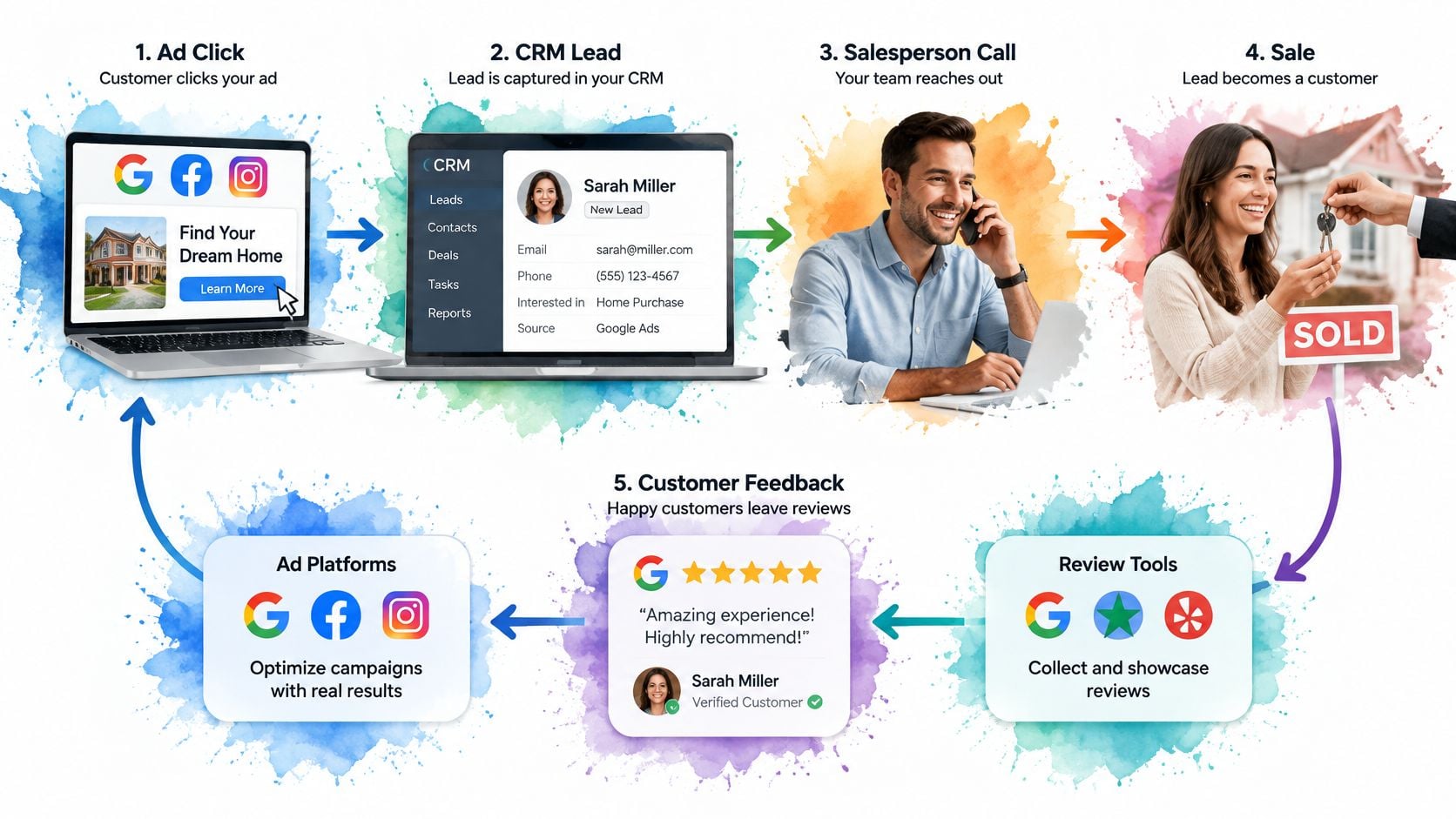
Connect the completed job to customer feedback
After a completed job, trigger an appropriate review request, log the response, and route negative feedback to a manager within hours. Apply an honest collection policy rather than inviting only customers predicted to praise the business.
Connecting email and CRM records helps staff check whether a request was sent, answered, or suppressed. Failed deliveries and unresolved service issues should create actionable exceptions, not disappear into an integration log.
We consolidate all of a customer's marketing services under one roof. The operational reason is to reduce manual exports and disconnected handoffs, but consolidation still requires documented field mappings, error handling, and accountability.
Keep review collection defensible
The FTC's Consumer Reviews and Testimonials Rule took effect on October 21, 2024, and prohibits fake or false reviews, including AI-generated reviews misrepresenting genuine experiences, as well as incentives conditioned on positive or negative sentiment.
Reviews republished in advertising become testimonials, and presenting nonrepresentative feedback can be deceptive, as explained in the Federal Register's final rule. Keep dates, customer identifiers, original review text, and records of where testimonials were reused. Don't present unusually favorable feedback as the typical experience.
Before approving an integration, answer:
- Source: Where does the original lead source live?
- Value: Where does the completed job's value return?
- Access: Who can export review data and its associated customer identifiers?
Keeping CRM Data Accurate, Secure and Owned
In a 2025 survey of 602 CRM users and administrators in the United States, United Kingdom, and Australia, 76% said less than half their CRM data was accurate and complete, 37% reported revenue losses attributable to poor data, and 25% said those losses reached at least 10% of annual revenue; the same survey found 46% had no full-time data-quality employee, 34% didn't know who owned the responsibility, and only 20% had formal governance policies.
CRM data risks, warning signs and controls
| Risk | Warning sign | Control |
|---|---|---|
| Duplicate records | Two entries for one customer and split attribution | Staged matching with confidence thresholds and quarantine for ambiguous merges |
| No data owner | Stale fields and no one accountable for accuracy | A named owner per record type and a monthly accuracy audit |
| Open access | Bulk exports or deletions with no trail | Role-based permissions and logs of exports, deletions and permission changes |
| Stale leads | Leads untouched for months still sitting in active stages | An aging rule that moves them to review or closes them |
Fix identity before expanding automation
Advertising leads, orders, and location records arrive with inconsistent phone and email formats. Normalize fields before matching, accept only sufficiently confident matches, and quarantine ambiguous merges for human review. Preserve original identifiers so staff can reverse mistakes.
Unified customer profiles should retain source lineage and consent history, not merely display a cleaner-looking contact card.
Assign responsibility next. Marketing owns acquisition-source integrity, sales owns opportunity outcomes, and service owns completion and complaint status. For franchises, name a location owner and a head-office owner so local exceptions remain visible.
Make access and accuracy auditable
NIST's security guidance supports least privilege, separation of duties, and protected audit records. Give users permissions by job function; separate campaign operators from administrators with export or deletion powers, and log bulk exports, deletions, and permission changes.
Finally, apply an aging rule to inactive opportunities. Don't let abandoned estimates inflate active pipeline.
Audit a random record sample monthly against a written accuracy threshold. Report one overall pass rate, backed by exception details and named owners. If source or outcome accuracy misses the threshold, hold budget expansion until the affected records are repaired.
Privacy, Consent and the Limits of Modeled Measurement
More customer data doesn't automatically mean better decisions. In a 2025 global study of 1,200 customer-data professionals, 88% considered real-time data essential, 68% had increased first-party-data investment, yet only 32% considered privacy and security critical to AI usage; respondents represented organizations with more than $100 million in annual revenue.
Smaller businesses should borrow the discipline, not copy enterprise-scale collection. Ask which fields segmentation, attribution, reviews, and reminders use:
- Permission: Consent status, consent source, and preferred contact channel.
- Commercial context: Service location and job or purchase value.
- Retention: A review or deletion date tied to the field's purpose.
Separate estimates from observed outcomes
When visitors decline analytics cookies, eligible consent-mode measurement can use machine-learning estimates to fill gaps. Modeled conversions aren't individual, directly observed customer histories, so label them separately in dashboards and explain the distinction when evaluating enhanced conversion measurement.
Google's consent-mode guidance says advertisers may need at least seven full days after implementation before uplift can be reported, and uplift appears only when the relevant data slice meets its minimum threshold.
Keep a field only when a named workflow needs it. Delete it when that purpose ends, subject to documented legal retention obligations.
Choosing Between Off-the-Shelf, Bundled and Custom CRM
CRM route comparison by business situation
| Route | Best fit | Main trade-off | Time to first results |
|---|---|---|---|
| Off-the-shelf standalone CRM | Teams that want a proven tool and own their stack | Integration work and admin time fall on you | After configuration, clean import, and user adoption |
| Bundled CRM inside a growth partner membership | Businesses that want ads, reviews and CRM connected | Lock-in and export terms must be checked before signing | After connected workflows pass an end-to-end test |
| Custom-built proprietary CRM | Unique workflows with in-house engineering | Highest build and maintenance cost | Longest of the three |
Don't choose based on the smoothest demonstration. Test the route against the people, connections, and obligations you'll have to manage.
Match the route to operating capacity
Team size and technical capacity come first. A hypothetical franchise with 30 locations needs location-level permissions and central oversight, not just more user accounts. A solo operator might need little beyond reliable task management.
Integration needs come next. Map how advertising, invoicing, and review records connect. Your marketing technology stack should support a coherent customer journey without requiring staff to reconcile exports each week.
Ownership, cost, and reputation complete the decision. Test export rights before signing, include administration and training in the budget, and decide whether sales staff need service feedback in the same record. A low subscription price doesn't eliminate internal labor.
Build only for a genuinely unusual workflow
Custom software makes sense when a business has distinctive data rules or processes that standard systems can't reasonably support, plus the engineering capacity to maintain them. A preference for different button colors isn't a custom-development requirement.
A bundled route can reduce integration work and add strategic support. The trade-off is dependence on the partner's architecture and contract, so check cancellation, migration, and export terms carefully.
I would usually start a solo practice under $500k in revenue with simple off-the-shelf tools. A service business wanting coordinated ads, reviews, and CRM should evaluate a bundled route; an enterprise with unusual requirements may justify custom work.
Ask every shortlisted vendor:
- Export: Can we retrieve contacts, activities, attachments, and source history?
- Audit: How are deletions logged and investigated?
- Cancellation: Who owns the records afterward?
- Reliability: Who handles failed integrations?
- Administration: Which ongoing tasks remain our responsibility?
How to Roll Out a CRM Your Team Actually Uses
Low utilization isn't fixed by another training presentation. Give staff a workflow that helps them complete real work, then require managers to use that workflow too.
A rollout should demonstrate practical value before it expands. Users need to know what to enter, what to do next, and where to get help when the system doesn't match the job.

Make the first workflow usable
Map sales and service on paper. Write down how an inquiry becomes a customer and how completed work reaches support. The common slip is copying template stages that don't match actual handoffs.
Define 8 to 12 required fields as a starting design constraint. Tie each to a named workflow, and allow fields to become required only at the relevant stage. Requiring invoice information before an initial conversation produces invented values, not completeness.
Import one clean source first. Current customers are a sensible pilot population because staff can verify their identities and status. Loading every historical list at once makes errors harder to isolate.
Establish a daily recordkeeping habit. Log calls, emails, and lead outcomes in the customer record, using supported capture where appropriate. Don't turn staff into duplicate typists, but don't assume captured activity includes a meaningful outcome.
Connect acquisition sources. Test that ad leads retain campaign and location information through assignment and booking. A successful connection message isn't proof that fields arrived correctly.
Run a 30-day operational review. Examine response times and stage ages, then change the assignment, reminder, or stage rule causing friction. The common mistake is changing configuration without rechecking the result.
Retire the spreadsheet on a fixed date. Keep any necessary historical archive read-only rather than maintaining a competing live pipeline. A shadow spreadsheet lets managers undermine the very behavior they're asking staff to adopt.
Manage from the system you expect staff to maintain
We test, measure, and optimize campaigns rather than guessing. Apply that same discipline to CRM adoption: measure, change, recheck.
A manager should open the live pipeline during reviews, resolve exceptions, and coach from actual records. If managers request separate spreadsheet summaries, employees learn which system really matters.
Look for observable adoption: most leads receive contact within your target response time, outcomes are recorded, and managers can run pipeline reviews without assembling another file. Login counts alone don't tell you whether anyone is selling more effectively.
Confirm Your CRM Fit Before You Commit
Choose a CRM based on who will own its records and how it connects to your revenue process. A polished demo cannot compensate for unclear ownership or unreliable data.
Test the features tied to your largest revenue leak. Set response-time and close-rate baselines, then assess results in light of lead mix and sales-cycle length. A short evaluation can show whether the workflow is usable, even before every opportunity closes.
Bring real operating information to the demo
Bring last quarter's lead sources, current pipeline stages, and monthly review volume. Request a demo using the Request a Demo or Book a demo button. Ask the presenter to trace an inquiry through your proposed workflow, including who maintains each record and how the resulting data supports revenue measurement.
The Ad Suite Membership includes access to the business's in-house CRM and Review Management Software. The Advertising Suite has more than 10,000 satisfied customers. For questions, email info@advertisingsuite.com.
Visit The Advertising Suite to request a demo using your actual lead-to-sale workflow. Assess whether its marketing services and tools fit your team's needs and ownership capacity.